HURT – Concussion Management




1. Raising an Incident
- HURT has been built to assist clubs in recording and managing the concussion lifecycle in-line with the AFL’s concussion policy.
- HURT provides Trainers/Medic’s with online forms to help them document concussion symptoms and “Return To Play” protocols.
- HURT intuitively guides the Trainer/Medic through raising an incident where a head knock has been received and there is a suspected concussion. HURT will record symptoms observed by the Trainer and ensure all relevant documents are completed and sent to the parent/guardian.
- HURT also acts as a repository for the club to capture all necessary documentation, including Concussion Clearance Forms, that are uploaded in preparation for a player’s return to play
.
1.1 Logging a Suspected Concussion – The Process
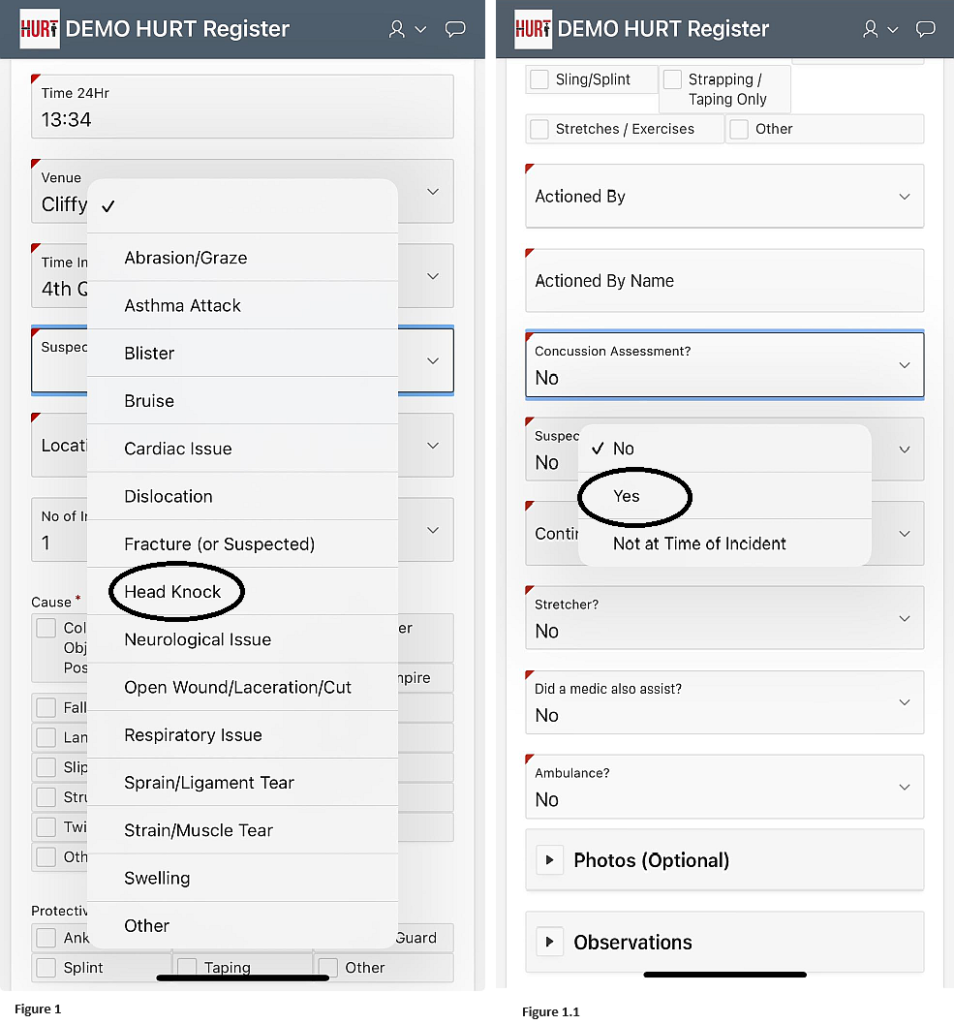
Once in the Incident Creation mode, a Concussion Assessment can be instigated in two ways:
- Under the Menu -> Suspected Injury/Illness if ‘Head Knock‘ is selected (Figure 1) OR
- Under the Menu -> Concussion Assessment, if ‘Yes‘ is selected (Figure 1.1)
Either option will present the Trainer/Medic with the following pop-up prompt (Figure 2)

Figure 2 – Pop Up Message Advising Trainer/Medics of Tools.
NOTE: The questions presented to the Trainer/Medic are in line with the AFL’s guidelines. Other tools such as CRT6 & the Head Check App should also be used.
On the same screen, the Trainer/Medic is presented with the ‘Identification of Red Flags’. (Figure 3)

Figure 3 – Red Flags Selection
As per the instructions on the form, if any ‘Red Flags’ are selected, an Ambulance should be called for immediate medical assistance (Figure 4).

Figure 4 – If any Red Flags are selected, as per the AFL Suspected Concussion protocol, the Trainer/Medic will be asked to acknowledge the request to call an Ambulance to seek further medical attention.
In the event that there are NO red flags, the user will select ‘None of the above’ at which point they will be presented with the ‘FEATURES OF A SUSPECTED CONCUSSION’.
On this page, the Trainer/Medic is required to review and select any features that apply (Figure 5).
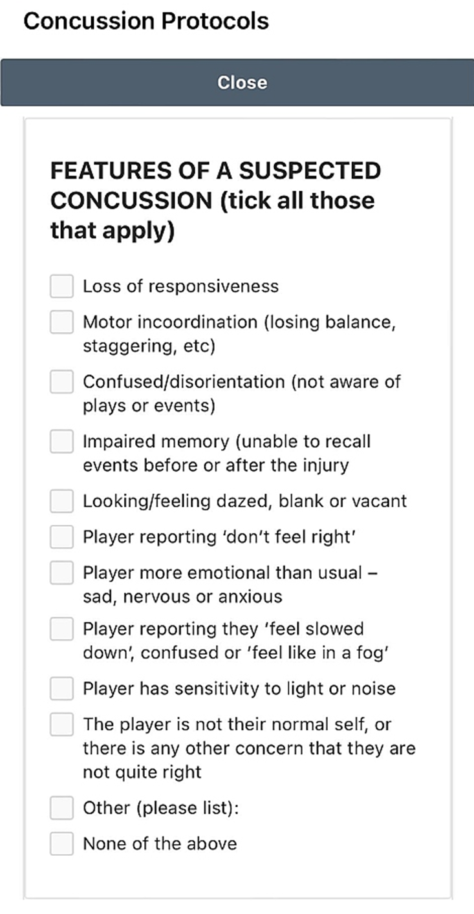
Figure 5 – Trainer/Medic is required to make a selection.
The Trainer/Medic may select one or more features of a concussion. In the event a selection is made, this will automatically trigger a ‘RETURN TO PLAY’ form to be emailed with the incident. This form will need to be completed by a certified health professional before the player is allowed to return to the field. This is in-line with the AFL’s requirements (Figure 6).
If the Trainer/Medic chooses ‘None of the above’ this means that the Trainer/Medic believes that there are no features of a suspected concussion and no medical review is required.
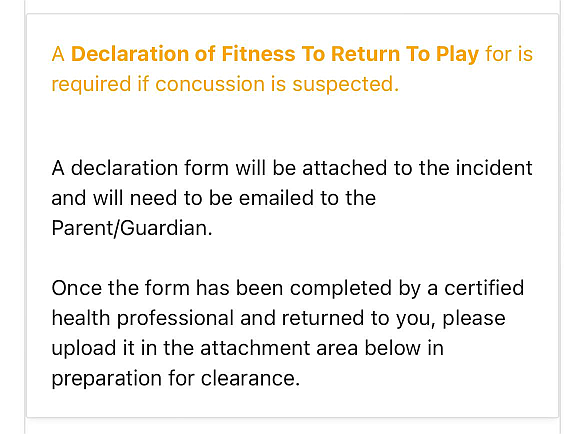
Figure 6 – In the event Trainer/Medic suspects a feature of a suspected concussion ‘A Declaration of Fitness To Return To Play’ is required and will be emailed to the parent/guardian. The above message which will appear informing the Trainer/Medic’s that the player will require a RETURN TO PLAY form to be completed.
2. Suspected Concussion Forms
Below are sample forms from ‘The Management of Sport-related concussion in Australian Football – AFL guide’. These forms will be mailed to parents/guardians of a suspected concussion player. It also includes the Incident report from HURT.


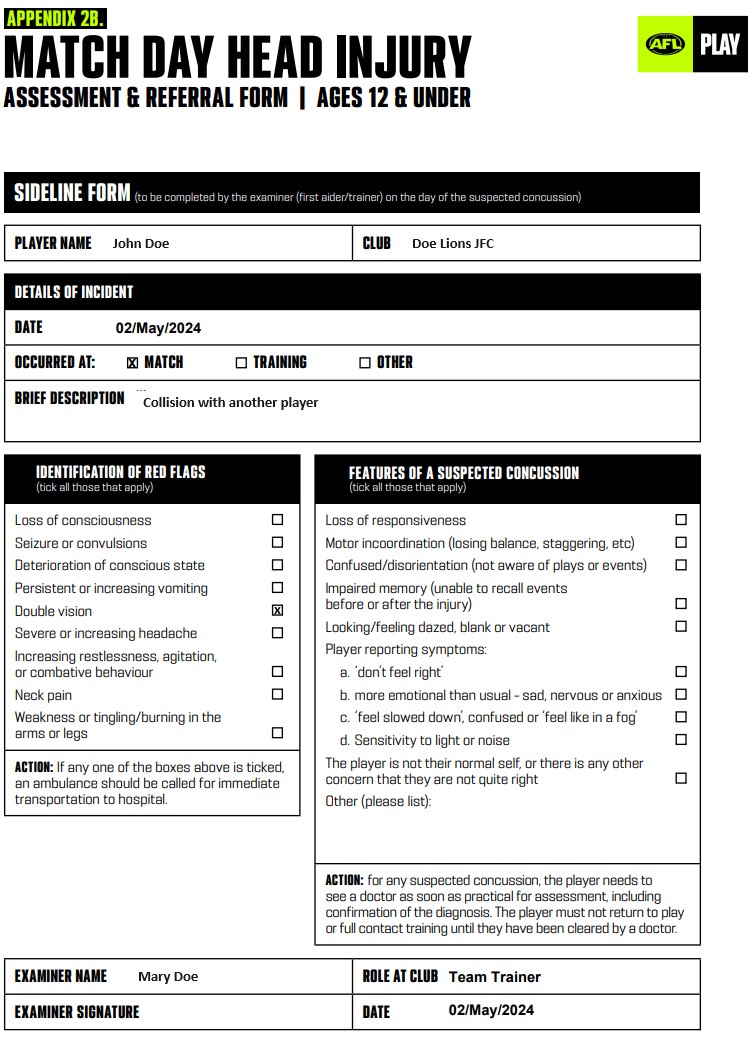

Forms which will be emailed to Parent/Guardian are:
- Match Day Head Injury (Assessment & Referral Form)
- Match Day Head Injury (Child Report in addition to Parent & Guardian Report | Ages 12 and Under) – if applicable
- Match Day Head Injury (Assessment & Referral Form | 13 Years & Above) – if applicable
- Medical Clearance Form (Return to Play Clearance Form)
- HURT Incident Report
NOTE: The HURT application also provides an online link for Parents/Guardians to complete the “Match Day Head Injury” Forms.
The Medical Clearance Form will need to be completed by a medical professional and returned to your Trainer/Medic
3. Return to Play
Following a Suspected Concussion, a player is required to be cleared by a medical professional prior to playing again. The HURT application reports on all outstanding Return to Play incidents and handles all Suspected Concussion documents. Once the player returns their form to the Trainer/Medic they are able to review it, store it in HURT and update the return to play data as advised by the medical professional.
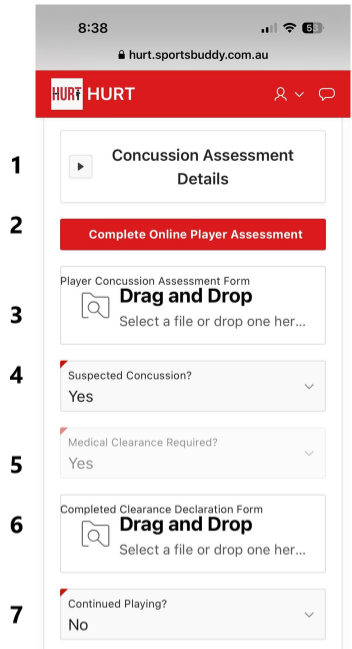
- [1] This is where the suspected concussion selections can be found.
- [2] If the Match Day Head Injury form is completed online, then this button will then turn green.
- [3] If the Parent/Guardian prefers to print and complete the form and return it to their trainer, this is where it is uploaded.
- [4] Suspected Concussion is flagged yes when a concussion red flag or feature is selected.
- [5] This is indicating that a Medical Clearance form is required.
- [6] Once the Return to Play(RTP) Form has been completed by a Medical Professional and returned to the Trainer, this is where the Trainer uploaded the document. Note after uploading, a date field will appear and this is where the Trainer inserts the return to play date that the medical professional has indicated. Once the player has been cleared, the player can return to the field.
- [7] This indicates that the player did/did not continue playing after the incident.
NOTE: The HURT application will also provide an online link for parents and guardians to complete the “Match Day Head Injury” Forms. (point #2)
Head Trainers/Medics at a club have access to real-time reports across all teams, advising them which players are awaiting RTP forms to be completed before being cleared to play.